Using CHICKEN with emacs
Various packages exist for supporting Scheme programming with the Emacs editor.
The chicken-contrib organization contains several useful Emacs packages.
CHICKEN's git repository contains two Emacs modes that can be helpful for writing CHICKEN code: chicken.el and flymake-chicken.el
geiser
Geiser is a Scheme mode that provides eldoc (modeline signatures and symbol evaluation), auto-complete and company-mode support, documentation search, et al. Chicken support for Geiser is near-complete and recommended for use.
Geiser is available on MELPA and via Git.
Chicken support requires some additional steps:
1. Install the necessary support eggs.
$ chicken-install -s apropos chicken-doc
For Chicken 5, you’ll also need SRFI-18.
$ chicken-install -s srfi-18
2. Update the Chicken documentation database.
$ cd `csi -p '(chicken-home)'`
$ curl http://3e8.org/pub/chicken-doc/chicken-doc-repo.tgz | sudo tar zx
With Chicken 5, this process has changed slightly:
$ cd `csi -e '(import (chicken platform)) (display (chicken-home))(newline)'`
$ curl https://3e8.org/pub/chicken-doc/chicken-doc-repo-5.tgz | sudo tar zx
On Windows you will need to remove the sudo command from the above snippets.
scheme-complete
Particularly recommended is Alex Shinn's scheme-complete, which provides intelligent autocompletion.
Dan's Emacs Extensions
dans-custom-emacs provides a set of extensions that enable full offline auto-complete w/ chicken-doc integration, complete font-lock support including prefixed modules, and support for all presently installed chicken modules.
Recommended for those who find themselves coding without a reliable REPL.
paredit
paredit provides structural editing for Scheme and Lisp code.
Quack
Neil van Dyke's Quack enhances Emacs support for Scheme and can be used for editing CHICKEN code.
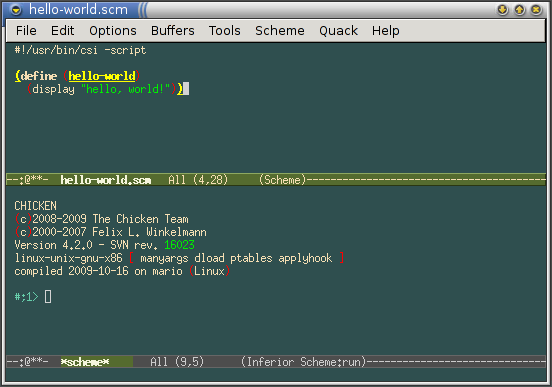
The screenshot above shows GNU Emacs using Quack to edit a "hello world" program and the CHICKEN REPL being executed from within Emacs.
Builtin Scheme support
Emacs has builtin support for syntax-highlighting of Scheme code and running a Scheme interpreter in an interactive buffer. To use it with CHICKEN, add this to your ~/.emacs file:
(setq scheme-program-name "csi -:c")
The -:c is to force interactive mode, which is required on some platforms (most notably Windows).
This variable is customizable, which is the preferred way in GNU Emacs and XEmacs to set user preferences: menu Options -> Customize Emacs -> Specific Option, type in scheme-program-name. Emacs displays a form; fill in csi -:c for the program name, click "Set for Current Session", and then "Save for Future Sessions". This will update (or create if it does not already exist) the custom-set-variables section in your ~/.emacs file.
Useful elisp snippets
I have these definitions in my ~/.emacs file, which allow loading the current buffer, optionally by compiling it first to native code:
(define-key scheme-mode-map "\C-c\C-l" 'scheme-load-current-file)
(define-key scheme-mode-map "\C-c\C-k" 'scheme-compile-current-file)

(require 'cmuscheme)

(define-key scheme-mode-map "\C-c\C-l" 'scheme-load-current-file)
(define-key scheme-mode-map "\C-c\C-k" 'scheme-compile-current-file)

(defun scheme-load-current-file (&optional switch)
  (interactive "P")
  (let ((file-name (buffer-file-name)))
    (comint-check-source file-name)
    (setq scheme-prev-l/c-dir/file (cons (file-name-directory    file-name)
					 (file-name-nondirectory file-name)))
    (comint-send-string (scheme-proc) (concat "(load \""
					      file-name
					      "\"\)\n"))
    (if switch
      (switch-to-scheme t)
      (message "\"%s\" loaded." file-name) ) ) )

(defun scheme-compile-current-file (&optional switch)
  (interactive "P")
  (let ((file-name (buffer-file-name)))
    (comint-check-source file-name)
    (setq scheme-prev-l/c-dir/file (cons (file-name-directory    file-name)
					 (file-name-nondirectory file-name)))
    (message "compiling \"%s\" ..." file-name)
    (comint-send-string (scheme-proc) (concat "(compile-file \""
					      file-name
					      "\"\)\n"))
    (if switch
      (switch-to-scheme t)
      (message "\"%s\" compiled and loaded." file-name) ) ) )
Tweaking stock scheme-mode indentation
;; Indenting module body code at column 0
(defun scheme-module-indent (state indent-point normal-indent) 0)
(put 'module 'scheme-indent-function 'scheme-module-indent)

(put 'and-let* 'scheme-indent-function 1)
(put 'parameterize 'scheme-indent-function 1)
(put 'handle-exceptions 'scheme-indent-function 1)
(put 'when 'scheme-indent-function 1)
(put 'unless 'scheme-indent-function 1)
(put 'match 'scheme-indent-function 1)
Auto-inserting portable shebang boilerplate on creating a scheme file
See also the writing portable scripts page.
(require 'autoinsert)
(add-hook 'find-file-hooks 'auto-insert)

(setq auto-insert-alist
      '(("\\.scm" .
         (insert "#!/bin/sh\n#| -*- scheme -*-\nexec csi -s $0 \"$@\"\n|#\n"))))
Mixing scheme and C code
Dan Leslie wrote emacs-multi-mode for easy switching between scheme-mode and c-mode.